
Let me be upfront. I've never run an open source project's community.
What I have done is build online communities for twenty years. CrazyEngineers has 400,000+ members, I've built a developer community at a B2B SaaS company where I led growth, and today I build Jatra, a community platform. So I have opinions on platforms, and I'll tell you when they matter.
The principles that make any community work apply to open source too. In this guide, I'll put those principles next to what maintainers and open source guides already say works. Where something is my opinion rather than open source experience, I'll say so.
New to communities in general? Start with how to build an online community. If your project is backed by a company and your users are developers, read how to build a developer community too.
Why open source communities are hard
Most projects are run by very few people. GitHub's Open Source Guides point out that most projects have only one or two maintainers doing most of the work. And most of them aren't paid for it: in Tidelift's 2024 maintainer survey, 60% of maintainers described themselves as unpaid hobbyists.
So the people who should be writing code end up answering the same questions in GitHub issues, over and over. "How do I install this on Windows?" "Is this a bug or am I doing it wrong?" The issue tracker turns into a support desk, and the maintainers burn out.
A community doesn't fix that by itself. But a well-built one moves a lot of that load off the maintainers and onto the people who use the project every day.
Know who you're building for
Before you pick anything, get clear on who your users are.
What are they building with your project? Where do they get stuck? What do they need to know before they trust it in production? What would make them want to contribute back?
Write it down. Half a page is enough.
Your issue history is the best place to look. Every closed issue that turned out to be a "how do I" question is a question your community should answer.
Decide where each question goes
This is the single most useful decision for an open source project.
Not every question belongs in the same place. Confirmed bugs and tracked work belong in GitHub issues. Settled answers belong in your docs. And everything else, the how-to questions, the ideas, the "look what I built with this", belongs in the community.
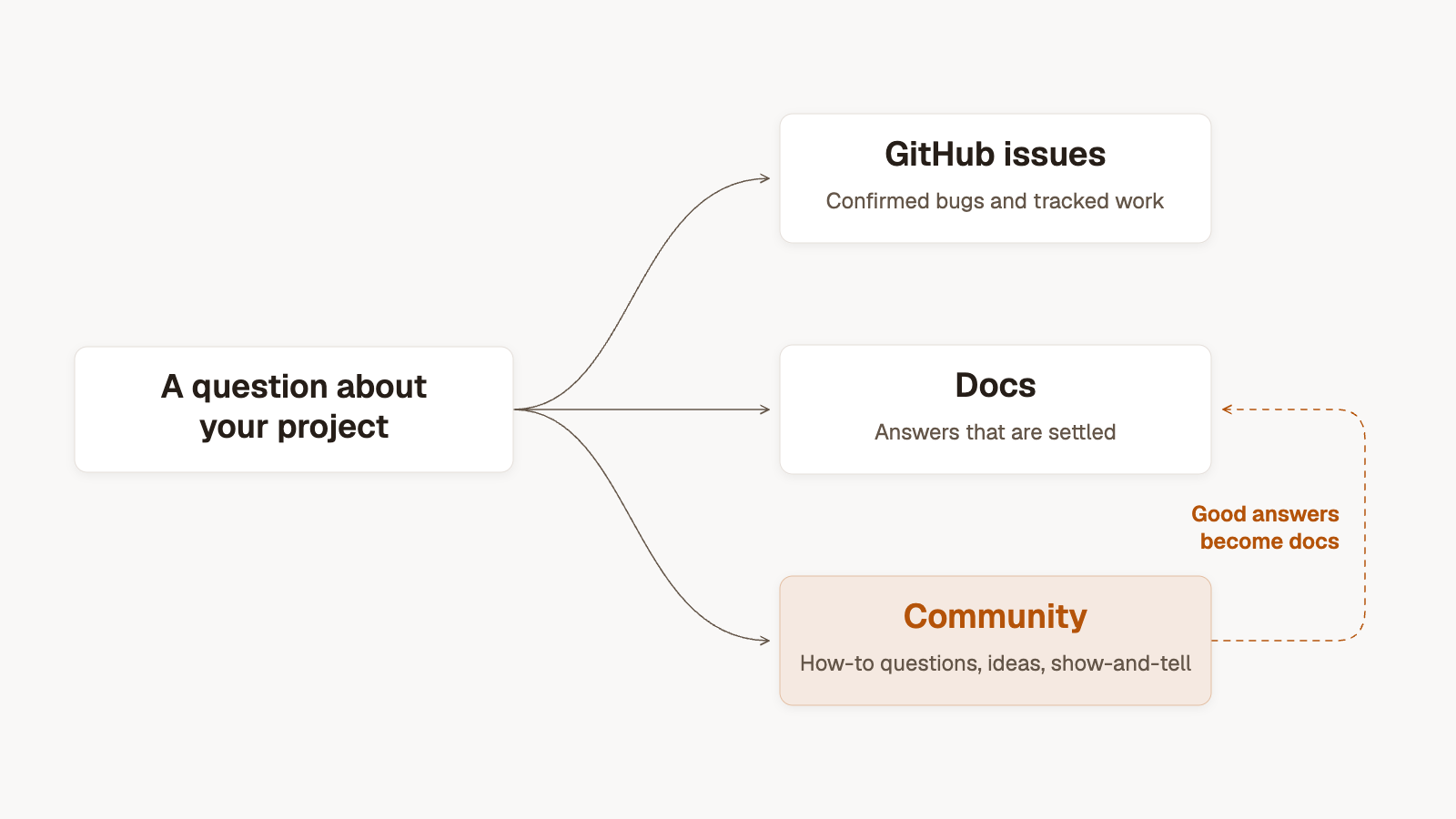
Write it down in your README and your contributing guide, so people know where to go before they open an issue. And when a question gets answered well in the community, move that answer into your docs. Over time, the docs get better and the repeat questions go away.
The Open Source Guides make a related point: send private questions to public channels, so the answer is there for the next person. I agree completely. An answer in someone's inbox helps one person. An answer in public helps everyone who has the same problem later.
Pick a platform that works for you in the long run
Many projects start with GitHub Discussions next to the repo, or a Discord server. That's a reasonable start. If it's working for you, there's no reason to move.
My opinion, from building communities rather than projects: be careful with chat as the main place people talk. A good answer in a busy channel lasts a few minutes or hours, then it's buried. Nobody outside the server will ever find it, and the same questions come back every week.
Whatever you choose, make sure the answers are public, permanent and easy to find. Every question should have its own page with a clear title. Good answers should be marked. And Google should be able to see all of it.
A dedicated community platform also gives you more than threads: announcements, a changelog, a roadmap, events and resources in one place, instead of spread across different tools. If you're weighing up options, I've compared Discord vs Jatra, and covered when to move a community off Slack, Discord or WhatsApp.
Seed it from your issue history
Before you invite anyone, fill the community with answers worth finding.
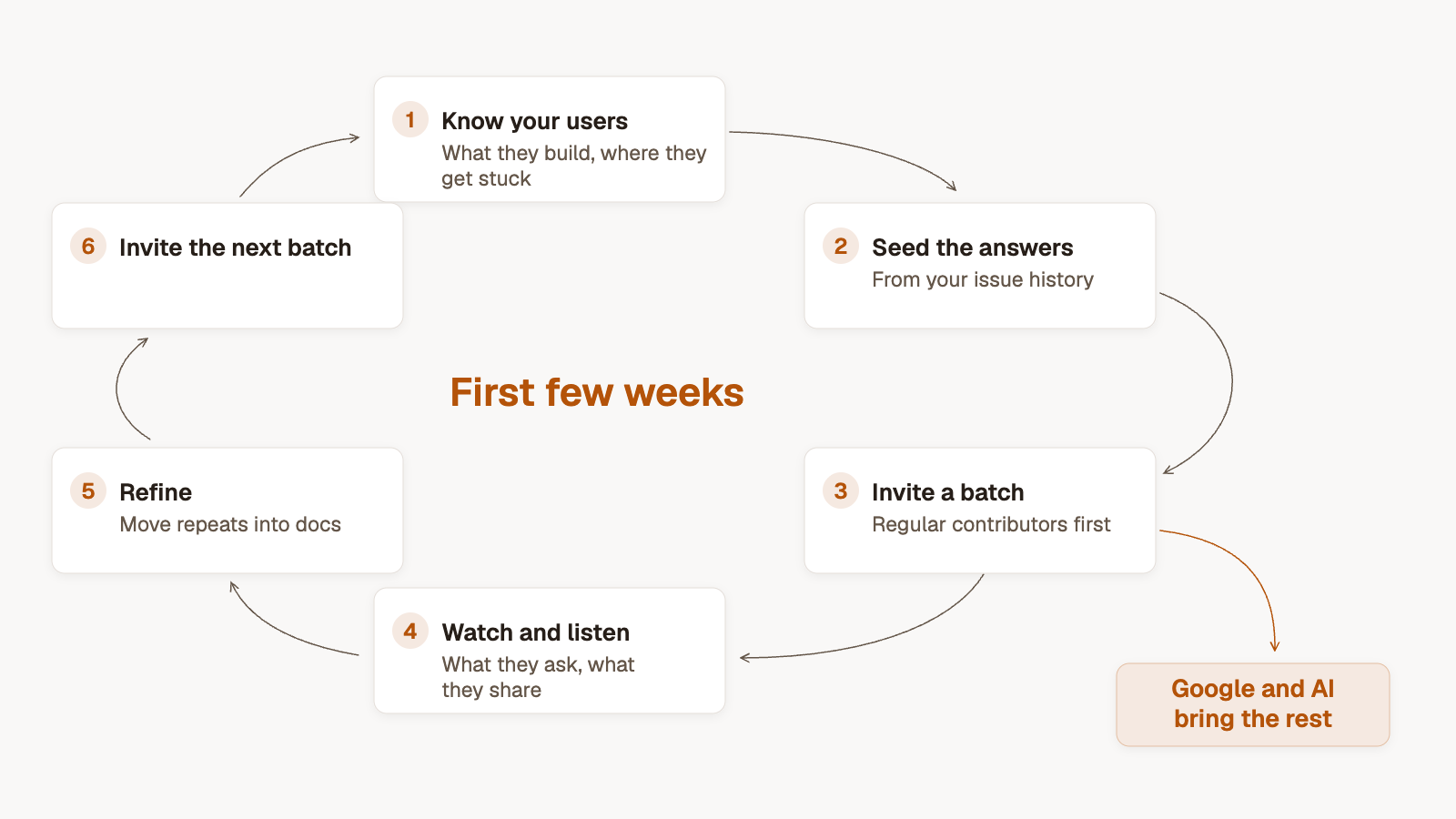
Go through your closed issues, your old discussions and the questions people ask about your project on Stack Overflow and Reddit. Pick the ones that come up again and again, and answer them properly, in their own threads. Include the code. Explain the why. Link to the docs.
I usually recommend about 50 pieces of content in the first 10 to 15 days. Depth matters far more than volume. The full method is in how to seed a community.
Invite your first batch: regular contributors first
Don't announce it everywhere on day one. Invite in batches.
Start with your regular contributors and your most active users, the people you already know from issues and pull requests. Give them early access and ask them to help answer questions. They know the project better than anyone except you.
Then watch what happens. Which threads get read? What do people ask next? Who comes back and helps someone else?
Watch, listen and refine
After every batch, look at what worked. Write what's missing. Move answers that keep coming up into the docs. Then invite the next batch.
Reply quickly, especially to new people. The Open Source Guides cite a Mozilla finding that contributors who got a code review within 48 hours were much more likely to come back and contribute again. The same goes for a newcomer's first question in your community. A fast, friendly reply gives them a reason to come back.
Recognise the people who help
Open source runs on people giving their time for free. Thank them in public.
The Open Source Guides suggest crediting contributors in a contributors file, in release notes, or in blog posts. In a community you can go further. At CrazyEngineers, we ran member interviews, and people loved being in the limelight. A short spotlight on a contributor, what they built and how they got started, costs you an hour and means a lot to them.
Recognising people who answer questions matters as much as recognising people who write code. They're the ones keeping the issue tracker clean.
Let Google and AI bring the rest
Once your public answers get indexed, the community starts growing on its own. A developer searches for an error message, finds a thread where it's solved, and joins to ask the next question. Some of them become contributors.
This is why I care so much about answers being public. Discussions we wrote on CrazyEngineers back in 2010 still bring in hundreds of visitors every month. A good answer about your project can keep helping people for years.
Build a knowledge base, not a chat room
Think of your community as a knowledge base your users build together, one that compounds over time.
Q&A and discussions, yes. But also guides, showcases of what people built, release announcements and a changelog, a roadmap people can comment on. Every one of those helps the next user get unstuck without opening an issue.
Frequently asked questions
Should an open source project use GitHub Discussions, Discord or a forum?
GitHub Discussions is a good start because it sits next to your code. Discord works for real-time chat but buries answers. A dedicated forum or community platform gives you public, searchable answers plus announcements, roadmap and events in one place. Pick based on where you want your knowledge to live in five years.
How do you reduce support questions in GitHub issues?
Decide where each kind of question goes, write that in your README and contributing guide, and point how-to questions to the community. Move the best community answers into your docs.
How do you get more contributors?
Make it easy to start, reply quickly to newcomers, and recognise people in public. Answering a question in the community is also an easy first contribution for someone who isn't ready to open a pull request.
Do you need a community manager for an open source project?
Not at the start. Maintainers and a few regular contributors can run it. As it grows, someone who enjoys helping people can take over the day-to-day. More on the options in who should run your community.
Where I'd start
If I were building an open source community tomorrow:
- Read your issue history and write down where users get stuck.
- Decide where bugs, settled answers and everything else should go.
- Pick a platform where answers are public and permanent.
- Write about 50 answers from your issue history before inviting anyone.
- Invite your regular contributors first, then grow in batches.
- Move the best answers into your docs, and let Google bring the rest.
If you'd like help building yours, see how Jatra works for developer communities, or book a call and tell us about your project.