



Community engagement

Community Engagement

Give members more ways to take part.

Configure member onboarding, profiles and a directory. Add community Rooms, best replies, badges, notifications and direct messaging for different ways to participate.

Member onboarding

Member Onboarding & Profiles

A name, a short introduction and a few shared interests give people an easier way into the conversation. Configure onboarding around your community.

Configurable onboarding
Guide members through their identity, interests, introduction and optional community rules.
Introductions & wave reactions
Introductions and wave reactions make a first contribution approachable. Shared interests help members find common ground.
Member profiles & directory
Profiles give contributions a human context. You can also enable a public or members-only directory.

Community Rooms

Community Rooms & Group Chat

Give an ongoing chat, a focused group or a time-bound conversation a place of its own. Members can talk without turning every message into a new post.

Mentions, quotes & reactions
Use mentions, quoted messages, reactions and message links. Share images and supported YouTube previews.
Room access & invitations
Room access and joining rules let public and private conversations serve different needs. Invitations and manager controls support the group.
Room expiry & history
Rooms can close at a set time. Authorized readers can still return to the conversation history.
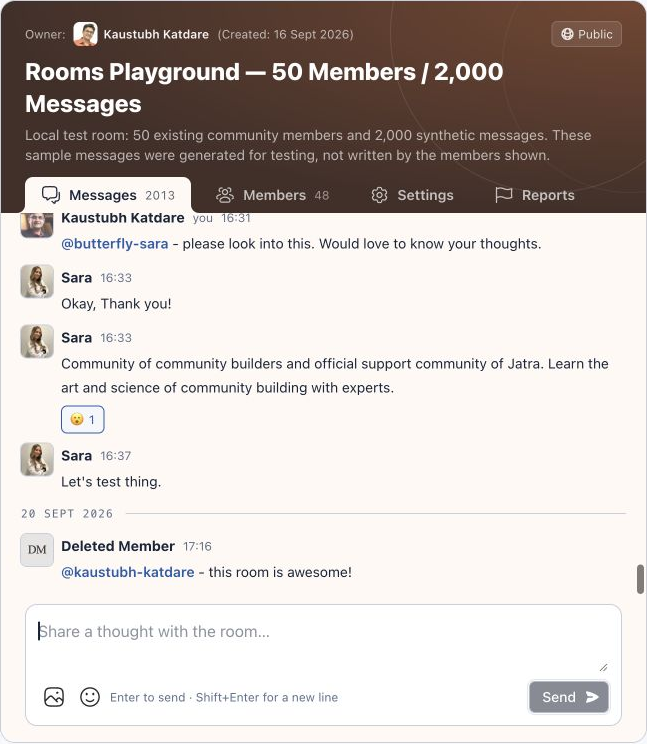
A community Room showing the conversation and message composer.

Replies & recognition

Best Replies, Likes & Member Badges

A reply, a like and a little recognition can make participation feel worthwhile. Keep useful contributions visible to the next person who needs them.

Best reply marking
Thread authors and staff can mark a best reply. Nested replies let people follow up without losing the conversation.
Custom member badges
Community-defined badges appear with member identities. Staff can assign them individually or in bulk, with expiry when needed.
Post & reply likes
Likes on posts and replies give members a simple way to acknowledge a contribution.
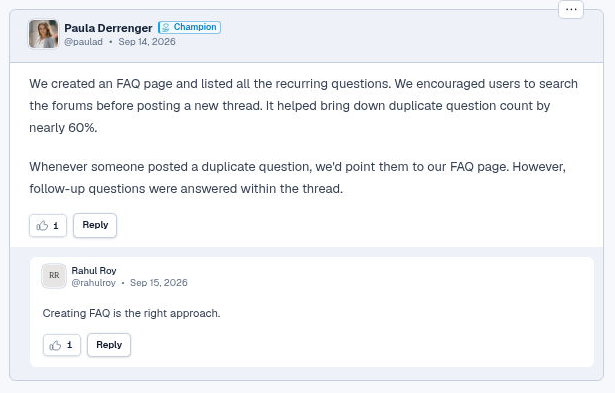
A member reply with a Champion badge, a nested reply and like controls.

Notifications & messaging

Notifications & Direct Messaging

Relevant notifications and private conversations make it easier to pick up the thread. Delivery and access rules keep the context intact.

In-app, email & web push notifications

Thread watching and in-app notifications help members follow activity. Supported emails and opt-in web push provide additional ways to hear about relevant updates.

One-to-one direct messaging

One-to-one direct messages start with a request. Eligibility, acceptance and mute controls give members a say in how they connect.

Access-aware search

Search eligible posts and replies with useful snippets. Results respect community and channel access, so a member sees what they are allowed to read.

Explore articles & resources
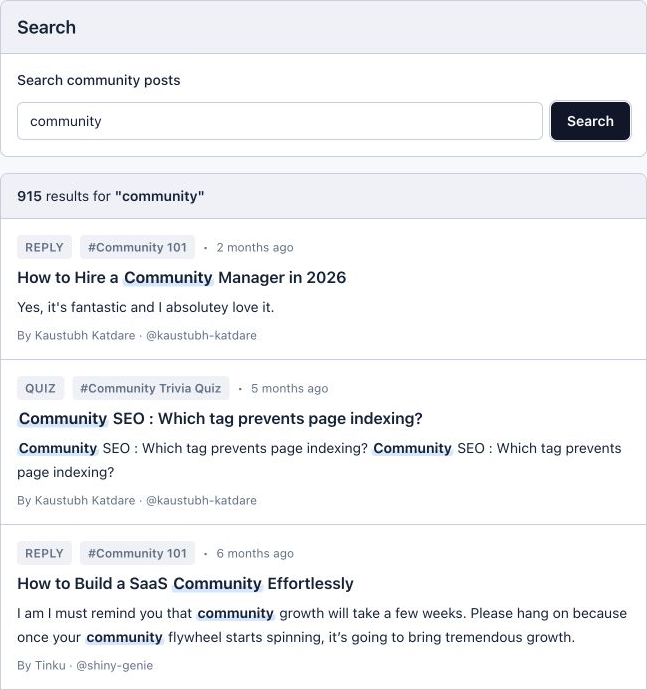
Community search results showing posts and replies with readable snippets, using an actual search query.

Good to know

Community Engagement Questions

Do badges change a member’s permissions?

No. Badges recognize members; owner, administrator, moderator and member roles control authority.

Does every activity send an email?

No. Supported email flows, in-app notifications and web push have different coverage and delivery rules. Access, preferences and message state affect delivery.

Does search include every format?

No. Search covers eligible posts and replies. Formats such as Rooms, memes and social posts are excluded from the current search index.

Can members create group direct messages?

The current direct messaging experience is one-to-one. Rooms provide a separate place for group conversations.

See it in Jatra

Explore Community Engagement

Walk through the welcome, conversations and connections your community can offer.