Moderation & Security
Clear rules. Safer spaces. Less spam.
Jatra screens new members’ posts, holds anything suspicious for review, and gives your moderators clear tools to act. The final call always stays with your team.

How the safeguards work
Five checkpoints between a spammer and your members.
Each layer catches what the one before it missed. Together they keep most spam from ever reaching a feed, without getting in the way of the people you want.
-
01
At the door
Disposable emails and banned domains are blocked, and banned members can’t sign up again.
-
02
The first three days
New members post at a measured pace, with links and images switched off.
-
03
Before it’s published
Jatra AI checks new members’ public posts and holds likely spam for review.
-
04
When members raise a flag
Anyone can report a post or reply, with a reason and a short note.
-
05
When a moderator acts
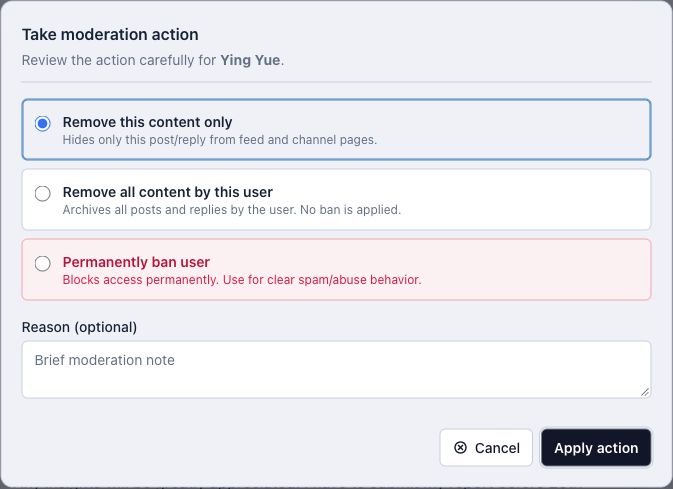
Remove one post, clear a spammer’s history or ban by email and IP.
01 At the door
Stop bad accounts before they write a word.
Most spam starts with a throwaway account. Jatra closes the easy doors before anyone gets the chance to post.
- Banned domains & disposable email
- Block whole email domains for your community. A built-in list already keeps out common disposable addresses.
- Bans that stick
- When you ban someone by email or IP address, a new signup from that email or IP is refused.
- Verified sign-in
- Email verification, ten-minute magic links, and Google or LinkedIn sign-in. Bot traps and rate limits protect signup and login.
02 The first three days
New members can join in right away, at a sensible pace.
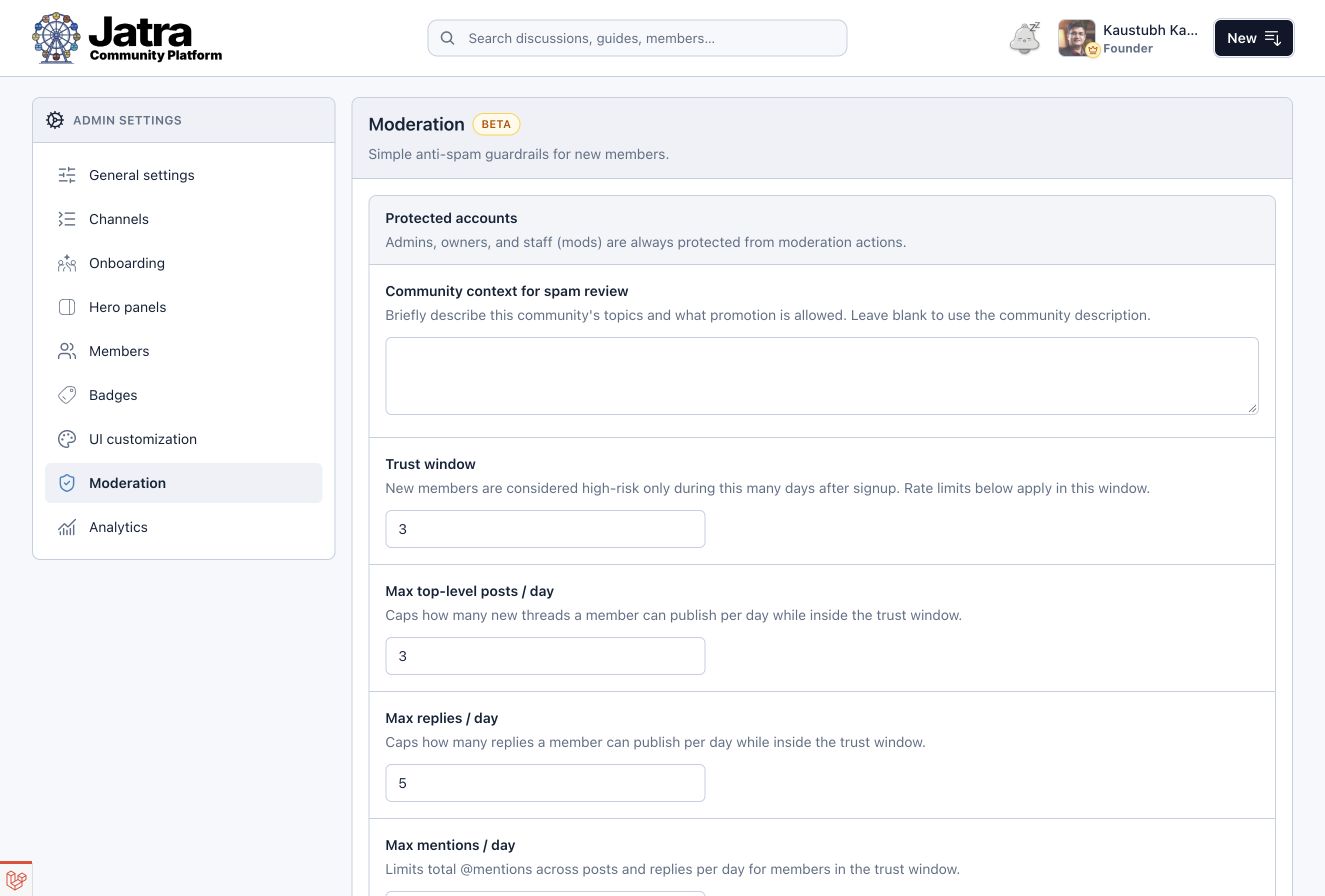
During their trust window, new members can post, reply and mention others within daily limits, and they can’t add links or images. Spammers lose interest, and real members barely notice.
- Trust-window participation limits
- Set the window from 1 to 90 days and cap top-level posts, replies and mentions per day. Every number is yours to change.
- Links and images when trust is earned
- Members see a clear note telling them when links and images unlock, so nobody is left guessing.
- Mention caps & profanity filter
- Mention limits per post and per reply always apply. An optional profanity filter replaces blocked words, with an allowlist for false positives.

03 Before it’s published · Jatra AI
Jatra AI holds the suspicious post. Your moderator makes the call.
When configured, Jatra AI reads new members’ public posts and replies in context and checks for unsolicited promotion and unrelated commercial links. Likely spam is hidden and queued for review. It never removes anything on its own.
- Context-aware content screening
- Checks consider the thread being replied to and a short description of your community, including what kind of promotion you welcome.
- Held, never waved through
- If a check can’t finish, the post is held with “AI check unavailable” rather than published unchecked.
- Edits are checked too
- When a screened member edits a published post, the earlier version stays live until a moderator approves the edit.
Who gets screened
- Not screened
Owners, admins and moderators
- Not screened
Posts in private channels
- Not screened
Established members with a clean history, 3+ days and 3+ posts
- Screened
Newer members, and anyone with earlier review history
04–05 Reports & moderator controls
When members raise a flag, moderators get the whole picture.
Members can report any post or reply with a reason and a note. Moderators are alerted in the app and by email, review it in context and act in proportion.
- Member content reports
- Reports capture reasons such as spam, abuse and harassment, plus an optional note of up to 280 characters. Moderator alerts reach the people who can act.
- Moderator review queues
- Each report links back to the original post or reply, so staff judge it in context rather than from a label alone.
- Content actions & member bans
- Remove one post, clear everything a spammer posted, or ban them and block their email and last known IP. You can also lock threads, pin posts and moderate Rooms.
- Thread locks
- Stop new replies when a conversation has run its course.
- Pinned posts
- Keep rules and announcements at the top of a channel.
- Room moderation
- Resolve or dismiss message reports, and ban someone from a Room or across the community.
- Removed, not destroyed
- Removed content is archived instead of permanently deleted.

Access & authentication
Clear roles, private spaces and login you can trust.
Use public and private channels for different needs. Roles and posting permissions define who can take part and who can moderate.
Role-based permissions
| Permission | Owner | Admin | Moderator | Member |
|---|---|---|---|---|
| Review reports & held posts | Yes | Yes | Yes | No |
| Remove content & ban members | Yes | Yes | Yes | No |
| Lock & pin threads | Yes | Yes | Yes | No |
| Change community settings | Yes | Yes | No | No |
| Read every private channel | Yes | Yes | If added | If added |
| Protected from moderation actions | Yes | Yes | Yes | No |
Staff accounts can’t be removed or banned through ordinary moderation actions, and nobody can moderate themselves.
- Private channels
- Public channels are readable by everyone, including guests. Private channels are open only to the members you select, and their content stays out of public sitemaps.
- Restricted posting
- Let anyone with channel access post, or allow only selected creators to start top-level posts, which suits announcements and resource libraries.
- Email verification & passwordless login
- Password recovery, email verification, magic links and Google or LinkedIn sign-in help members get into their accounts safely.
Managed for you
The safeguards you never have to think about.
Server-side data backups are part of Jatra’s managed operations. Your moderation team can focus on people while we handle the work behind the scenes.
- Server-side data backups
- Included in managed operations. Tell us your retention and recovery needs before launch.
- Every moderation step on record
- Reports, reviews, removals, bans and Room actions are recorded as they happen.
- Archived, not erased
- Removing content archives it rather than permanently deleting it.
Good to know
Moderation & security questions
Does AI automatically decide every moderation action?
No. Assisted screening depends on configuration and submission eligibility. Flagged content is held for moderator review; it does not replace human judgement.
What happens if a screening service is unavailable?
If a configured content screening service fails during a check, the submission is held for moderator review rather than published unchecked.
Can new members post links on their first day?
Not by default. During the trust window, three days unless you change it, new members can’t add links or images. You can switch this off or change the window length in your moderation settings.
Can moderators read private channels?
Only the private channels they have been added to. Owners and admins can see every private channel.
Can I ban someone’s email and IP address?
Yes. When banning a member, moderators can also block their email and last known IP address, and new signups from either are refused.
Are private channels publicly indexed?
Private content remains subject to its access rules and is excluded from public sitemaps. Read more on the SEO and AEO page.
How are backups managed?
Data backups are managed on the server side. Contact us to discuss the retention and recovery arrangements your community needs; we’ll confirm those arrangements with you.
See it in Jatra
Give your moderators a calmer week.
We’ll walk through screening, reports, roles and access using a community like yours, and talk through what your team needs before launch.