

I remember the early days of CrazyEngineers in 2005. I had started an engineers' community without thinking about budget or team.
I asked some of my friends to start contributing, but all of them refused. The problem is, no one likes to participate in an empty community. No one likes to be the first one to take action.
I did what I had to: I created about five accounts on the community. I'd log in with one account and ask a question. A few hours later, I'd log in with another account and offer an answer. I kept the discussions open-ended so that I could log in from a few more accounts and keep the discussion flowing.
It solved two problems. The community started getting interesting questions. And anyone who visited thought it was active, with a bunch of people having fun discussing really crazy topics.
Frankly speaking, this technique works. Reddit's founders did the same thing around the same time, and Steve Huffman has talked about it openly.
Yahoo Groups and Yahoo Messenger chat rooms were popular back then. I literally spammed them with a link to my community. 99.99% of the time, the link was ignored, and I got banned from many of the rooms. But that 0.01% took note and clicked.
I did that for almost a year, and that's how we got our first 100 members. In the meantime, friends had also joined, and we were creating 20 to 50 posts per day. I no longer had to log in to different accounts to build activity in the forum.
It took us two years before the community gained real momentum. That momentum came from Google. Strangers found our discussions, liked what they read and joined. I still remember one discussion about preventing aircraft hijacks. Engineers shared really weird ideas, from new ways of scanning passengers at airports to automated pellet guns mounted inside the aircraft.
Because the community was seeded properly, it set the foundation for strong growth. Over the next few years, we grew to 1.5 million pageviews a month without ever spending a buck on advertising or marketing.
What is community seeding
Seeding is laying a strong foundation for your community. It includes setting up your community channels, identifying who your members are and building content that creates instant value for them.
The hard part is: you have to do it on your own in the beginning. That's how all the large, thriving communities are built.
Decide the niche
My advice to anyone starting a new community is simple: nail the niche. It fixes almost everything and gives you immediate focus.
CrazyEngineers looked general from the outside. It was for engineers, all of them. But we grew by focusing on one thing: innovative ideas. I call it a broad niche. Not sure that's even a term. It worked because people knew exactly what kind of conversation they'd find.
Do not start a general community today. You won't succeed. Reddit, Quora and YouTube already cover every broad topic, and AI answers the generic questions in seconds. It's easier to build a community that masters one niche and serves people who deeply care about it.
Same goes for a business community. Start with customers at one stage of using your product. People integrating your API ask very different questions from people rolling it out across a whole company.
Throughout this guide, I'll use a community for first-time engineering managers as an example. It's illustrative, not a real community.
Step 1: Know who you're building for
Before you write a single post, picture the person you want in your community. Who are they? What are they trying to achieve? What scares them? What have they already tried? Where do they go for help today?
Write it down. Half a page is enough.
Take our engineering manager. Until recently, they were a senior engineer. Now they manage people who used to be their peers. Code doesn't scare them. Giving feedback and running one-on-ones do.
Your first picture will be partly wrong. That's fine. The next step fixes it.
Tip: If you run a SaaS product, read your support tickets first. Most of the answers are already sitting there.
Step 2: Find the questions people already ask
People have their own ways of expressing their pain. The easiest way to find how they describe their problems is to go where they hang out: subreddits, Facebook groups, Slack and Discord servers, WhatsApp and Telegram groups, Quora, and even your competitors' communities.
Join them. Participate and observe.
Tip: Never promote your community there. You'll get banned.
Your job is to observe and be helpful. You can learn so much just by reading their archives.
Copy the way they write their questions. The style, not a word-for-word copy. Make a list of 20 to 30 real questions and look for recurring themes.
For our engineering managers, you'd see questions like "My one-on-ones feel like status updates. Is that normal?" and "What app should I use for one-on-one notes?" Two different questions, one theme: one-on-ones. That's your first topic.
Don't overthink every question though. Sometimes the person asking for a note-taking app just wants a good note-taking app.
If you use private customer conversations, remove anything that identifies the person. Ask before you share anyone's story.
Step 3: Write painkiller content
I call the best seed content painkiller content. It solves a problem your member has right now.
A vitamin is "10 leadership quotes for new managers." A painkiller is "What to ask in your first five one-on-ones." Members read vitamins and move on. They use painkillers, and then they come back for more.
Use three formats. Q&A for one specific question. Discussions where many people's experience helps. Articles for bigger topics that need a full explanation. A template works too, when people need something they can copy.
See that last line? It turns the answer into a conversation. Every seeded post should leave a door open for members to add their own experience.
Connect related posts
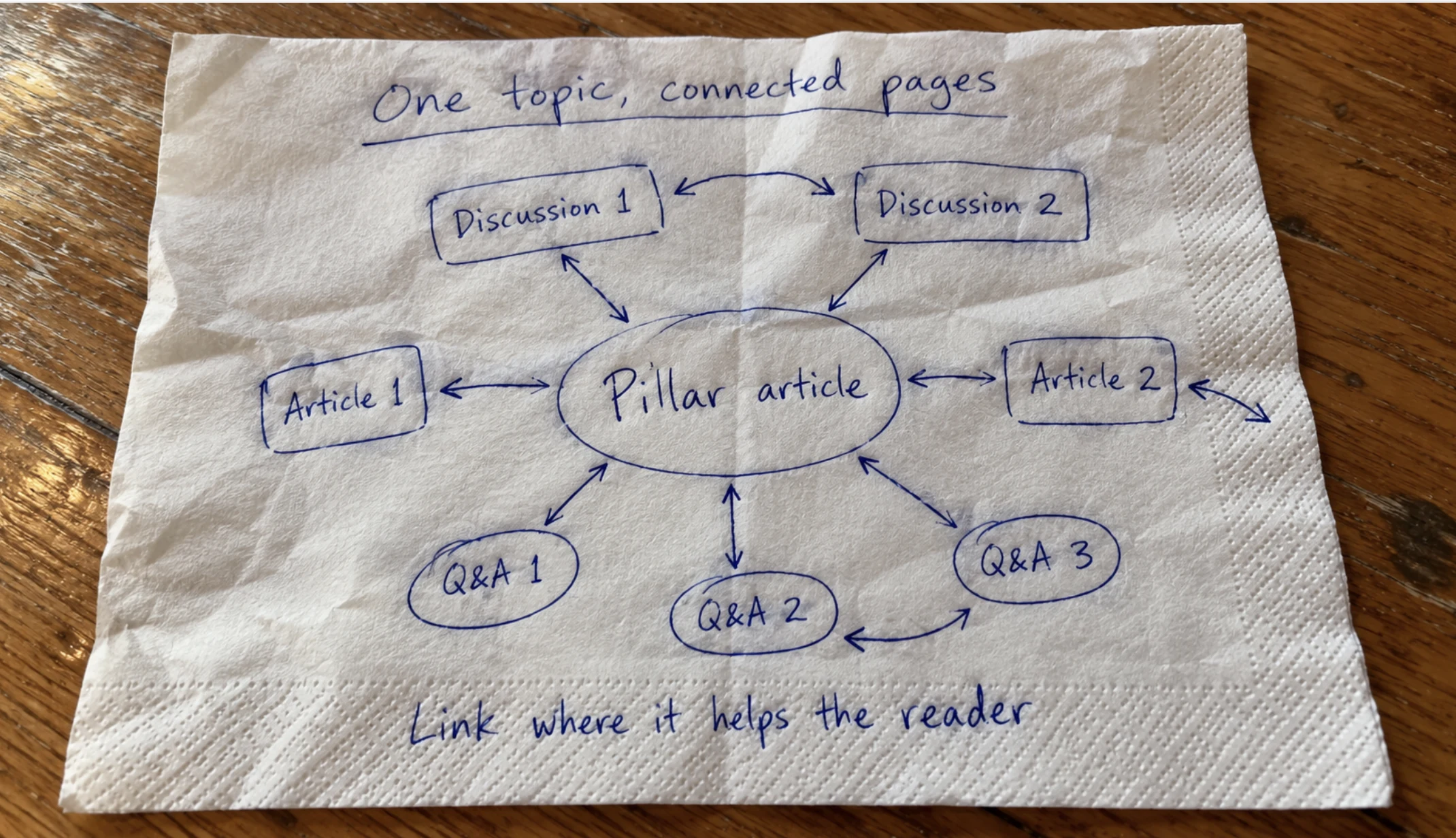
Each topic gets one top-level article. Your Q&As and discussions on that topic link to it. Make it natural. Link only where the reader would want to go next.
This is also your topic build, so SEO favours you. Google sees many connected pages covering one subject in depth, and the article collects the authority.
If two pages answer the same question, merge them.
For a small launch, I'd start with one article, five Q&As and two discussions around your most important topic.
Make your answers public
I'm biased here, because Google is where CrazyEngineers got its real growth. If you want strangers to find your community, your answers have to be readable without logging in. Keep sensitive customer conversations private. Open up everything else.
Tip: A page you can open in your browser isn't necessarily a page Google has indexed. Check it in Search Console.
Google's guidance on AI features says the usual SEO practices apply to AI Overviews and AI Mode, and you don't need any special AI markup. Good public content gives you a shot at being found and cited by AI too.
Step 4: Bring in your first people
Once a few useful posts are up, invite people who can add to them. Friends first. Then customers who already send you feedback, and the helpful people you noticed in other groups during step 2.
Start with five to ten people. That's small enough to personally help each one with their first post.
Tell each person why you thought of them, and ask for something small:
Hi Priya, I'm starting a small community for first-time engineering managers. I've posted a guide to running your first one-on-ones. You mentioned that managing former teammates was difficult at first. Would you be willing to add one thing you wish you'd known? A few sentences would help.
Send them straight to that post. If they get stuck signing up, help them. When they post, reply.
What about extra accounts?
I used five accounts at the start of CrazyEngineers, so I won't lecture you. Friends are better, because nobody has to pretend. But if you have no one to call in, a few extra accounts can get you through the empty weeks. Members care whether an answer helps, not who typed it.
If you go that way, keep it clean. Post only real questions, the ones you collected in step 2. Give answers you'd happily put your own name on. Never invent experiences, reviews or testimonials. And retire those accounts the moment real members start showing up.
Tip: For a brand's customer community, skip this completely. Use a team account and say who's posting. Getting caught will cost you more than an empty forum ever will.
Step 5: Keep the conversations going
Launch day is the start, not the end. For the first few months, you're the heartbeat of the community.
Check every working day. Reply to new questions within a day. A first post that gets no reply is usually that member's last.
When you spot a member who knows the topic, pull them into the thread. Let follow-up questions decide what you write next.
How do you know it's working? Members start answering each other before you get there. Posts you didn't start outnumber the ones you did. People find your Q&As on Google and sign up.
When you see that, step back slowly. Someone still has to own moderation and unanswered questions, though. A community always needs an owner.
A 30-day seeding plan
If a schedule helps, here's how I'd spend the first month:
- Days 1 to 5: Talk to potential members and collect 20 to 30 questions.
- Days 6 to 10: Write one article, five Q&As and two discussions around one topic.
- Days 11 to 15: Personally invite five to ten people.
- Days 16 to 23: Reply to everything and fix whatever confused people.
- Days 24 to 30: Look at what worked and pick your next topic.
A month is enough to test your approach. Real momentum takes much longer. For CrazyEngineers, it took two years.
Mistakes I'd avoid
Too many categories. Twelve empty categories look worse than three busy ones. Add more only when things get crowded.
Writing to fill a quota. If a good answer fits in three paragraphs, leave it at three paragraphs.
Welcome threads that lead nowhere. Point every new member to a question or discussion that fits them. Otherwise they say hello and never come back.
AI content that reads like AI. AI is fine for research and first drafts. But members spot generic, machine-written answers fast, and then they stop trusting all of them. Edit until it sounds like someone who has done the job.
Inviting more people than you can handle. If questions are already going unanswered, more people just means more unanswered questions.
Stepping back too early. First-week activity is mostly curiosity. Watch the next few weeks before you assume it'll keep going without you.
Where I'd begin
Take one question a potential member has already asked. Write an answer you'd put your name on. Then invite one person who knows the topic to add to it. What they say back will tell you what to write next.
Building a community for your business? If you're looking at Jatra, bring a few questions your customers keep asking. That's the best place to start.