

This buyer's guide is for B2B SaaS founders and marketers. Its purpose is to help you look beyond Slack and Discord when you build your community.
Before comparing software, check whether your business is ready to build a customer community. A useful member purpose and a named owner should shape the platform requirements.
A lot of founders regret the decision they made by following convention. Community is a long-term commitment, and a wrong choice can bite you for years.
Disclaimer: the author of this article is the founder of Jatra Community Platform. This guide is vendor neutral. There is no pitch.
Use the platform scorecard to compare three vendors with your own weights and requirements.
If you need internal approval before choosing a vendor, build the community business case around the full cost, available team time, and evidence you will review.
Basics: Get Clear on What a Community Platform is Not
A community platform is not a chat app, a helpdesk, or a Facebook group with your logo on it.
Chat tools move fast and forget faster. Helpdesks exist to log tickets, close them, and move on.
A community platform is built for your current and future customers. It is the place where your users talk to each other, find answers, share feedback, suggest features, help shape the roadmap, and bring in new users.
If the tool you are evaluating is a messaging app wearing a "community" label, you will feel it within a quarter.
The Signs You Have Outgrown Slack, Discord, and Facebook Groups
You may have noticed that good content disappears fast, within days or weeks depending on how active your community is. None of it shows up in Google.
That is how these closed spaces are designed to work, and it is exactly what makes them a poor fit for a B2B SaaS community.
We have spoken with so many community managers sitting on dead Slack and Discord groups that we wrote a guide on reviving a dead Slack community.
Start by defining what a B2B SaaS customer community is actually for, so your requirements follow the job you need it to do.
The Decision Matrix: 9 Questions to Ask
When you evaluate platforms, these nine questions do most of the work. Score every option you are considering against each one.
If you want a companion view of the market while you score options, read our breakdown of the best community platforms for B2B SaaS.
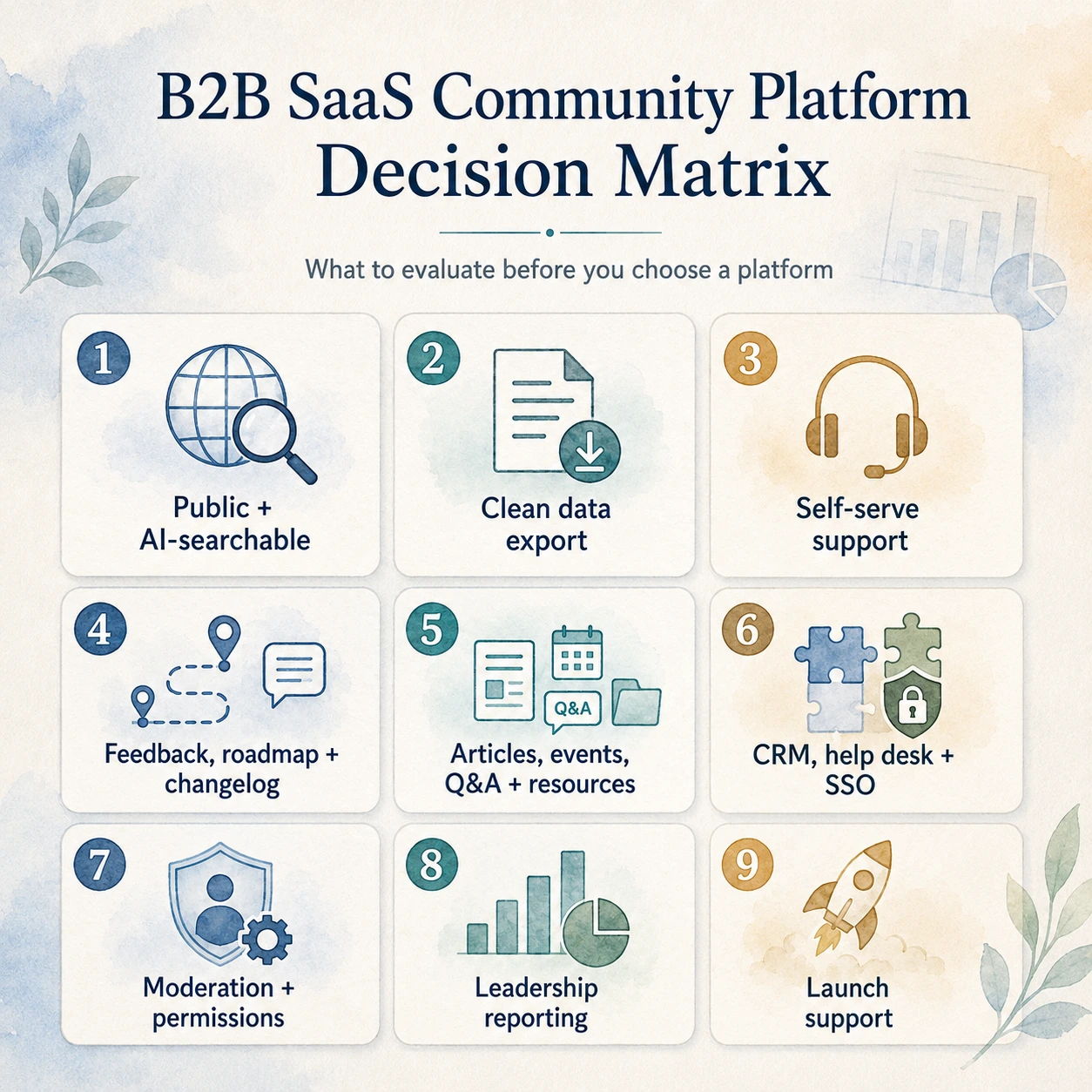
1. Can Google (and ChatGPT, Perplexity) Find Your Community?
Community is usually treated as an engagement layer, not an acquisition layer. That is the mistake.
The biggest divide between platforms is whether the content your members create is public and indexable. If it lives behind a login, you have trapped that knowledge and said NO to organic user acquisition.
Well-run communities expose most of their content to search engines and LLMs, so they earn referrals organically. It is customers pulling in new customers.
SEO and AEO are not optional for a B2B community platform. We wrote a detailed guide to help you evaluate SEO-friendly forum software.
See how search and AI discovery actually work on a community platform, then check a public page while logged out. Indexability makes discovery possible; it does not guarantee rankings or AI citations.
2. Who Owns the Data?
Hosting location alone does not determine ownership. Read the contract and data-use terms, then ask for a sample export of posts, member profiles, and attachments. Check that relationships, timestamps, and usable file formats survive the export.
Your threads, articles, and replies contain feedback, feature requests, and buying signals. Before using AI to analyze them, check your permissions, privacy commitments, and the model provider's data-use terms. Ask whether the platform or its subprocessors use community content to train models, and what controls you have. Do not infer that answer from who hosts the database.
3. Will It Cut Support Costs, or Just Move Them?
Answering the same question again and again is a waste of time and money. In a good community, most questions get answered once and become public knowledge. When customers can find direct answers, support costs drop.
There is also an advantage here that AI cannot touch. Your customers want to feel heard. A real person answering a question, or even just acknowledging a piece of feedback, goes further than a smart answer from a bot ever will.
4. Does Customer Feedback Reach Your Product Team?
The best feedback is buried in comments, complaints, and the questions customers ask in passing.
Modern B2B community platforms let you collect structured feedback, publish a changelog, and show your roadmap inside the community itself. Your members do not get bounced to three different apps to be heard.
5. Can It Hold More Than Discussions?
A B2B customer community needs more than a discussion board. You will want articles, events, polls, downloadable resources, quizzes, chat rooms, and feedback, all in one place to keep members informed and engaged.
Here is an angle most teams miss: smart B2B companies hire from their own communities. If your platform can post your open roles, your most engaged members see them first, alongside newcomers.
6. Does It Fit the Tools You Already Run On?
Your community cannot be an island. It should connect to your CRM, your help desk, and your single sign-on.
When it does, community activity flows into the rest of your business. You learn who your champions are, which accounts are active, and which customers are quietly going cold, without anyone copying data by hand.
Identity: how people get in, and how they get out
Question six asks whether the platform connects to your single sign-on. Start with whether customers should reuse the identity they already have in your product. Ask which protocol the vendor supports: SAML, OIDC, and a proprietary token handoff require different integrations.
Then test the way out. When a customer cancels or an employee leaves their company, does their community access end automatically? SCIM can synchronize account changes and automate deprovisioning. Other integrations can also automate removal. Neither an SSO logo nor SCIM support alone proves that existing sessions end promptly.
Ask for documentation naming the protocol, the plan, and the offboarding behavior. During the trial, remove a test user's access and check both a new sign-in and an already open session, including any alternate login method. Agree on the acceptable revocation delay. A feature available only on a higher plan is unavailable on the plan you are evaluating.
7. Can You Keep It Civil Without Living in the Moderation Queue?
Every growing community attracts spam and the occasional bad actor. What matters is how much of that you can handle automatically.
Look at spam controls, roles, and permissions. Email verification confirms control of an inbox; it does not prove someone is a customer or keep competitors out. For sensitive discussions, test invitation rules, customer eligibility, and access permissions for private spaces. Good governance is what lets a community scale without eating your week.
8. Can You Prove It Is Working?
Sooner or later, someone will ask what the community is worth. You need numbers ready.
The platform should show member growth, engagement, and retention, and ideally connect community activity to support savings and product outcomes. If you cannot measure it, you cannot defend the budget for it.
9. Are You Launching Alone, or With Help?
The first ninety days need deliberate attention. Without useful seed content and someone driving early momentum, even capable software can open to an empty room.
So ask what happens after you sign. Do you get a login and a good luck, or does someone help you launch? An empty community is worse than no community, and for your first one, this is often the difference between alive and dead.
Also ask what makes a community platform reliable, including ongoing support after launch.
Public, Private, or Hybrid?
The instinct is to lock everything down. For B2B SaaS, that is usually the wrong call.
Keep the sensitive things private: support tickets, private feedback, beta groups. Make the general discussion and knowledge public, so it is discoverable and useful to people who have not joined yet.
Think of a shop with clear windows, not blacked-out glass. The best setups are hybrid: anyone can read, participation needs a login.
Testing access before you trust it
The public and private split is a design decision. Verifying that the platform enforces it is a separate evaluation step.
Build a role map: anonymous visitor, registered member, paying customer, beta participant, moderator, your staff, and the vendor's support team. For each role, record what it should be able to read, write, and export.
Use test content and accounts in your trial. Log out and open a private space URL directly. Give a test member access to one private space, then check search results, notifications, member directories, attachments, and email digests for content from another space. Repeat after removing access. Test each route to the content rather than relying on a hidden navigation link.
Request written answers about where data is stored, whether you can choose the region, the data processing agreement, subprocessors, and deletion and retention after cancellation. Include backups and exports in the retention question.
Record unverified answers as U with a follow-up question. Your security reviewer decides which safeguards are mandatory and what evidence is sufficient.
What Should You Expect to Pay?
Pricing tends to split two ways. Self-serve tools start cheap and scale by seats or members. Platforms built for B2B run on flat monthly plans, often a few hundred to a few thousand dollars, usually after a demo.
Cheaper is not automatically better. A low-priced tool that pulls in the wrong members, or that you outgrow in a year, costs you more than it saves. Budget for the platform and for the person who runs it.
If your buyer has a security review
Bring procurement and security into the evaluation early. Their requirements may include SAML or OIDC sign-on, SCIM provisioning, a data processing agreement, a SOC 2 report, data residency, audit logs, and a named contact for security questions. Agree on the response timeline your review needs. This is a requirements discussion, not a universal checklist every buyer must demand.
Availability and pricing vary by vendor and plan. Ask for a quote covering your actual requirements, implementation work, and any add-ons before shortlisting. A low entry price is not evidence that the tier you need will fit your budget.
Ask for proof. For a SOC 2 report, check the date, review period, covered services, and scope with your security reviewer, and ask about access under NDA. Record missing evidence as U instead of treating a badge as a pass. Mark requirements procurement will not waive as mandatory.
For Jatra, review what Jatra ships today and request confirmation of the specific capability and plan. Apply the same evidence standard to every vendor; a planned feature is not a shipped capability.
The Mistakes That Quietly Kill B2B Communities
The same mistakes show up again and again:
- Choosing a closed, unsearchable platform, then wondering why the community never grows.
- Letting the sales team treat members like leads until everyone leaves.
- Launching with no content, so the first visitors arrive to silence and never return.
- Buying on feature count instead of the nine questions above.
Most dead communities were lost at the platform-choice stage, long before the day-to-day.