Moderate Content: Report Queue, Remove, Ban
Handle reported content quickly with safe moderation actions.
5 min read
Updated Mar 4, 2026
Before You Start
- Sign in with a moderator, admin, or owner account.
- Open the community feed.
- Use moderation actions carefully because some actions cannot be undone.
Step 1: Open the Reported Queue
- In feed filters, open `Posts`.
- Select `Reported`.
- Review the items in the queue.
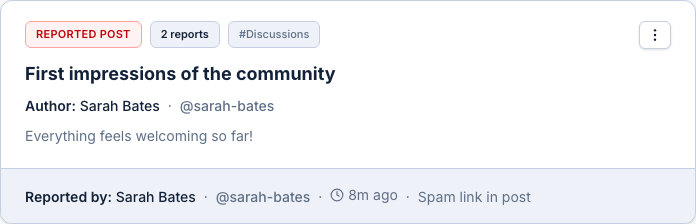
Step 2: Review Context First
- Click `View context` on a reported item.
- Read the original post or reply fully.
- Check report reason and note before taking action.
Step 3: Take the Right Action
- Use `Remove current content only` for one-off violations.
- Use `Remove all content by this user` for repeated spam behavior.
- Use `Permanent ban` only for serious or repeated abuse.
Step 4: Mark the Report as Reviewed
- After handling an item, mark it reviewed from the queue action menu.
- Move to the next item in the queue.
Expected Result
Reported content is reviewed quickly, unsafe content is handled, and your queue stays clean.